Free · No log in · No ads
Ultimate Retrieval Tool
Create the perfect do now, low-stakes quiz, interleaved practice, or homework.
What does it look like?
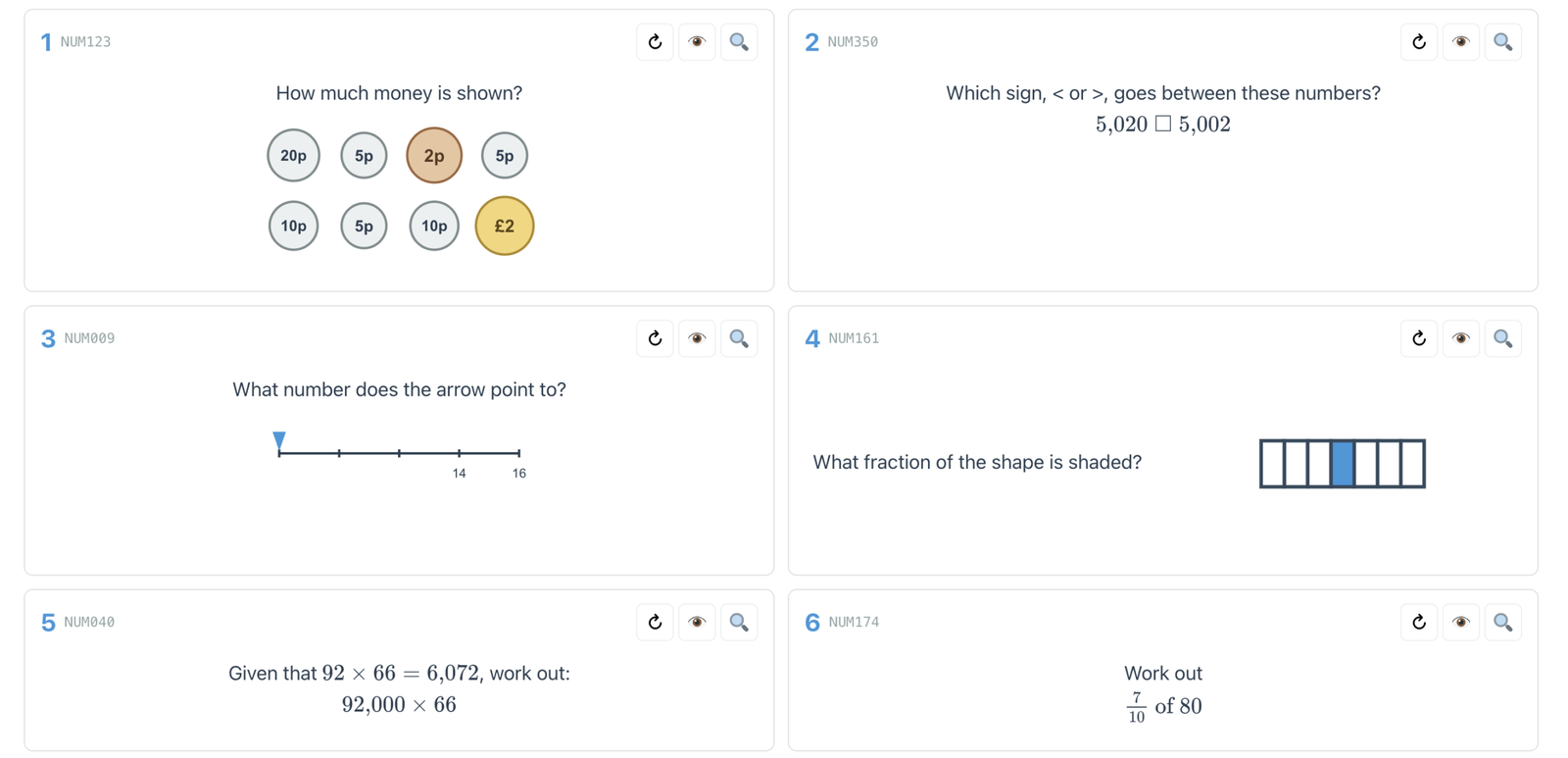
Six things this tool can do
A code on every worksheet
Every quiz you generate has a short code printed on the worksheet and a QR code alongside it. Type the code into the page (or scan the QR) and you get the same quiz back — answers, working-out, the lot. Use it in class to walk through the answers. Share it with students so they can revisit the quiz at home.
A worksheet that fits on one side of A4
Whether you pick four questions or ten, the worksheet always fits cleanly onto a single side of A4. No awkward half-pages, no font that shrinks question-by-question. Print, photocopy, done.
Blocked or interleaved practice
Practise one skill or many in a single session — from one area of the maths curriculum, or right across it. Block a topic for focused fluency, or interleave to build the harder skill of choosing the right method.
Geometry, not just arithmetic
Most retrieval tools stick to topics where the question is a single line of text. This one renders diagrams as well, so the geometry topics aren't quietly missing.
Generate another question on the same skill, in one click
Every question has a ↻ button next to it. Press it and you get a fresh question on the same skill, with different numbers, a different diagram, a different context. Useful for tweaking a quiz before you print it, for follow-up questions when students get stuck, or for students at home wanting more practice on a skill they're shaky on.
Generate a whole follow-up quiz, in one click
Once a quiz is locked in, a single button builds a follow-up: same skills, same order, fresh questions. Use it for the next lesson's retrieval, for in-class practice after going through the answers, or for the in-class follow-up to a homework quiz (more on that below).
Four ways to use it
Do Now
Generate four questions, project them on the board, and run a starter activity that you didn't have to write yourself. When a student gets stuck on one of the questions, hit ↻ for a fresh question on the same skill — and use it as a follow-up to check the misconception is cleared.
Low-Stakes Quiz
Generate a ten-question quiz, print it for the class, and run it as a weekly retrieval routine. Go through the answers in class using the code on screen. Share the code with students so they can revisit the same quiz at home — and use ↻ to generate fresh questions on any skill they want more practice on.
Interleaved Practice
Build a worksheet that mixes a skill students have just learnt with skills they've encountered earlier in the year. Students get retrieval practice on the older skills and a chance to switch between the new skill and the old ones — which is where the benefits of interleaving really come from.
Homework
A practical answer to AI cheating. Set the homework on paper — students can use the worked solutions, AI, or whatever they like to complete it. Then, in the next lesson, give them a follow-up quiz (same skills, fresh questions) with no help available, and judge the homework effort on how they do. The point of the homework shifts from “this is the assessment” to “this is preparation for the assessment”.
The importance of retrieval practice
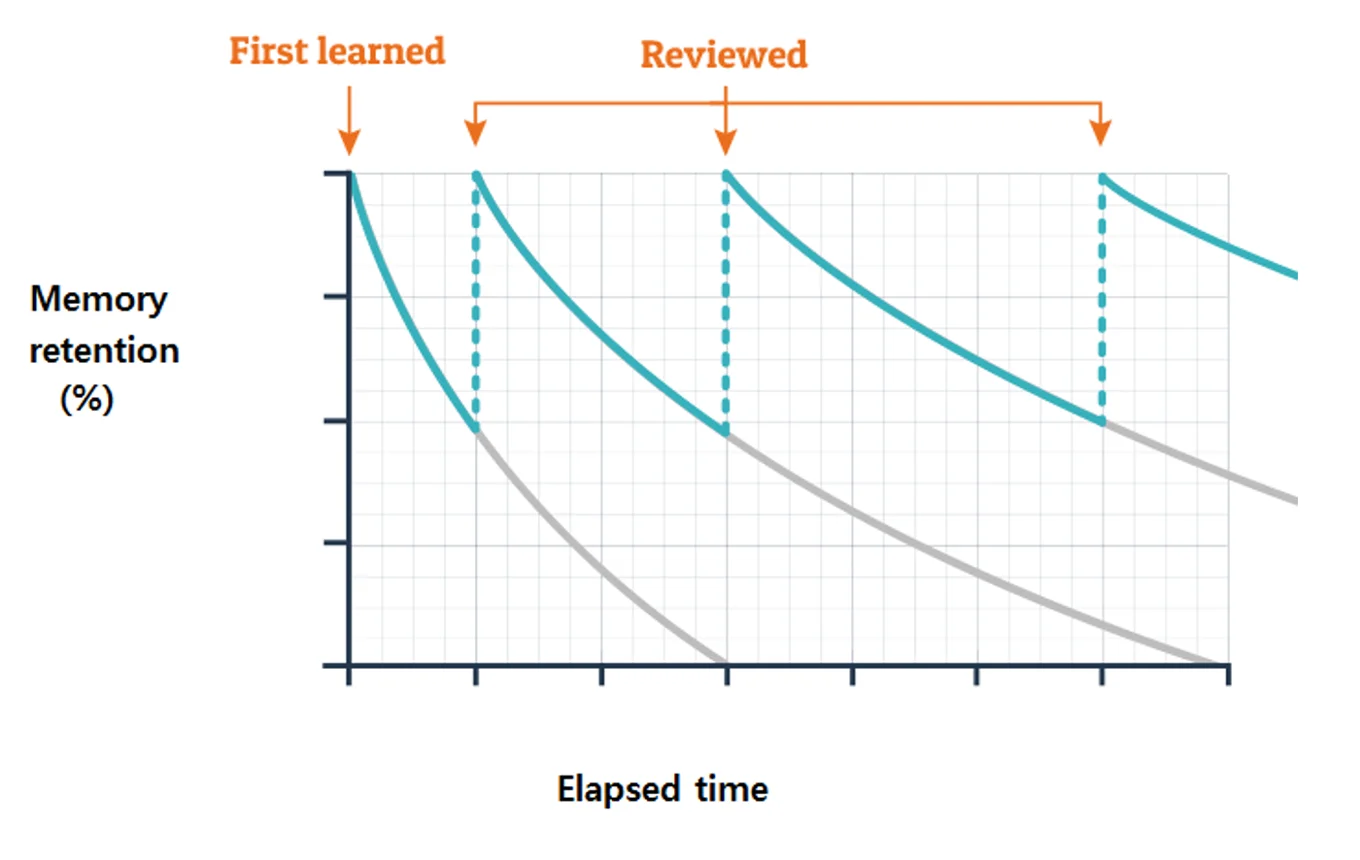
According to the Bjorks' New Theory of Disuse, each time students think hard about something they once knew, the retrieval strength and storage strength of that memory both improve. This makes the memory more durable, more available the next time it's needed, and slows the rate of forgetting.
How to use it
Teachers
Build a bespoke do-now low-stakes quiz, interleaved practice set, or homework. Print the worksheet and use the code in class to walk through the answers. Share the code with your students so they can revise at home, and with your department so everyone can use the same quiz.
Tip: Use the same code the next lesson to walk through the answers.
Students
Practise any topic — or any mix of topics — on your own, or load the code your teacher gave you. Check your answers with full working-out steps. Generate fresh questions on any skill until you've mastered it.
Tip: Quizzes you find a bit hard are the ones helping you most.
Parents
Support your child's revision without needing to know the maths yourself. Open the code your child or their teacher shares to see the same questions plus the full working out. Sit with your child or set them off independently — then review what they got stuck on together.
Tip: Little and often beats long cramming sessions. A few questions a week makes a real difference.
Get the most out of this tool
This page gives you the questions. The books help you do something useful with them.
The Ultimate Retrieval Tool picks topics, balances difficulty, and prints the worksheet. What it can't do is the rest of the work: choosing when in the lesson a Do Now earns its place, how to mark the quiz (or not), what to do when students get the same thing wrong three weeks running, how to make a Low-Stakes Quiz feel genuinely low-stakes to the students, not just to you. That's what these two books in the Tips for Teachers guide to… series are for.
Tips for Teachers guide to…
The Do Now
Those essential first few minutes of a lesson: the content and structure of effective Do Nows, how to check for understanding, and how to respond to what students get wrong.
Find out more →
Tips for Teachers guide to…
Low-Stakes Quizzes
A weekly Low-Stakes Quiz can be one of the most effective ways to give students regular retrieval. This book covers what makes a quiz effective: its content, format, marking, and what students do with their corrections.
Find out more →